


.svg)
.svg)
.svg%201.svg)



Get Business Email
No domain name required
Create .Edu Email
Get yourname@yourdomian.edu ID

Key Takeaways
- The only real source of an edu email: A .edu address comes from an accredited US college that enrolls or hires you. Generators and sellers can't issue one.
- The low-cost edu email route: One real community college or continuing education class gets you a student account. You still pay that class's tuition and fees.
- What people get wrong about edu email discounts: The address alone rarely works. Brands such as Spotify confirm current enrollment through SheerID, so old or bought accounts fail.
- What to do before your edu email expires: Forward your mail and switch every linked login to a permanent address. A business email on your own domain from Neo Mail starts at $1.25 per mailbox per month on the 4-yearly plan.
How Do You Get an Edu Email?
You get an edu email by enrolling at, or working for, an accredited US college or university. The school's IT team creates the account for you, so you can't register or generate one yourself. The school, not you, decides who gets an address, so the first question is whether you qualify.
Who Can Get a .edu Email Address?
Five groups qualify: degree students, students in a single class, college staff and faculty, some alumni, and students in accredited online programs. In each case, the college issues the address. You never sign up for it on a public website.
The .edu domain has strict rules. EDUCAUSE, a nonprofit for higher education IT, manages it. Since October 29, 2001, only US postsecondary schools with institutional accreditation can register a new .edu name. K-12 schools and schools outside the US can't. (Source: EDUCAUSE .edu eligibility)
Access to a .edu address lasts only as long as your link to the school. Students lose it when enrollment ends, and staff lose it when they leave the job. Alumni access depends on each college's own policy.
A .edu address is a normal school mailbox. Colleges often run it on Google Workspace for Education or Microsoft 365, so it looks like Gmail or Outlook once you log in.
Most readers aren't full-time students, so the next question is how to get a real address for the least money.
What Is the Cheapest Legitimate Way to Get a .edu Email?
The cheapest legitimate way to get a .edu email is to enroll in one real class at an accredited community college. Many colleges also offer continuing education or non-degree classes. You pay the class's tuition and fees, and the college issues your student email once your enrollment goes through.
Real users give the same advice. A popular answer in Reddit's r/UnethicalLifeProTips was simply: "Sign up for a class at your local community college." That route is honest, but it costs money, and fees vary by college and state.
Follow these five steps:
- Check the school: Confirm it has institutional accreditation in the US Department of Education's DAPIP accreditation database.
- Enroll in a class: Pick a credit class or a continuing education course, and check that it comes with a student account.
- Pay tuition and fees: Your enrollment is only complete once the college receives payment.
- Get your login from IT: The college sends your username and first password, usually after it processes your enrollment.
- Activate the account: Log in, set a new password, and turn on forwarding to your personal inbox.
Before you pay, check the offer you want. Some discounts accept only degree students. Others need proof of enrollment beyond the email address, so a single class may not qualify.
Not every real student has a .edu address, though, so the next section covers student emails with a different ending.
How Can a School Get .edu Email With Neo Mail?
An educational institute that already owns a .edu domain can connect it to Neo Mail and create addresses for staff and departments. Neo Mail can't issue a new .edu domain because only EDUCAUSE registers .edu names, and only for accredited US colleges. The free domain that comes with every Neo Mail plan is a regular domain, not a .edu one.
Neo Mail customers include higher education institutions. Its plans suit a small college or a single department. For more than 50 mailboxes, Neo Mail's pricing page points larger teams to a separate option.
Follow these five steps:
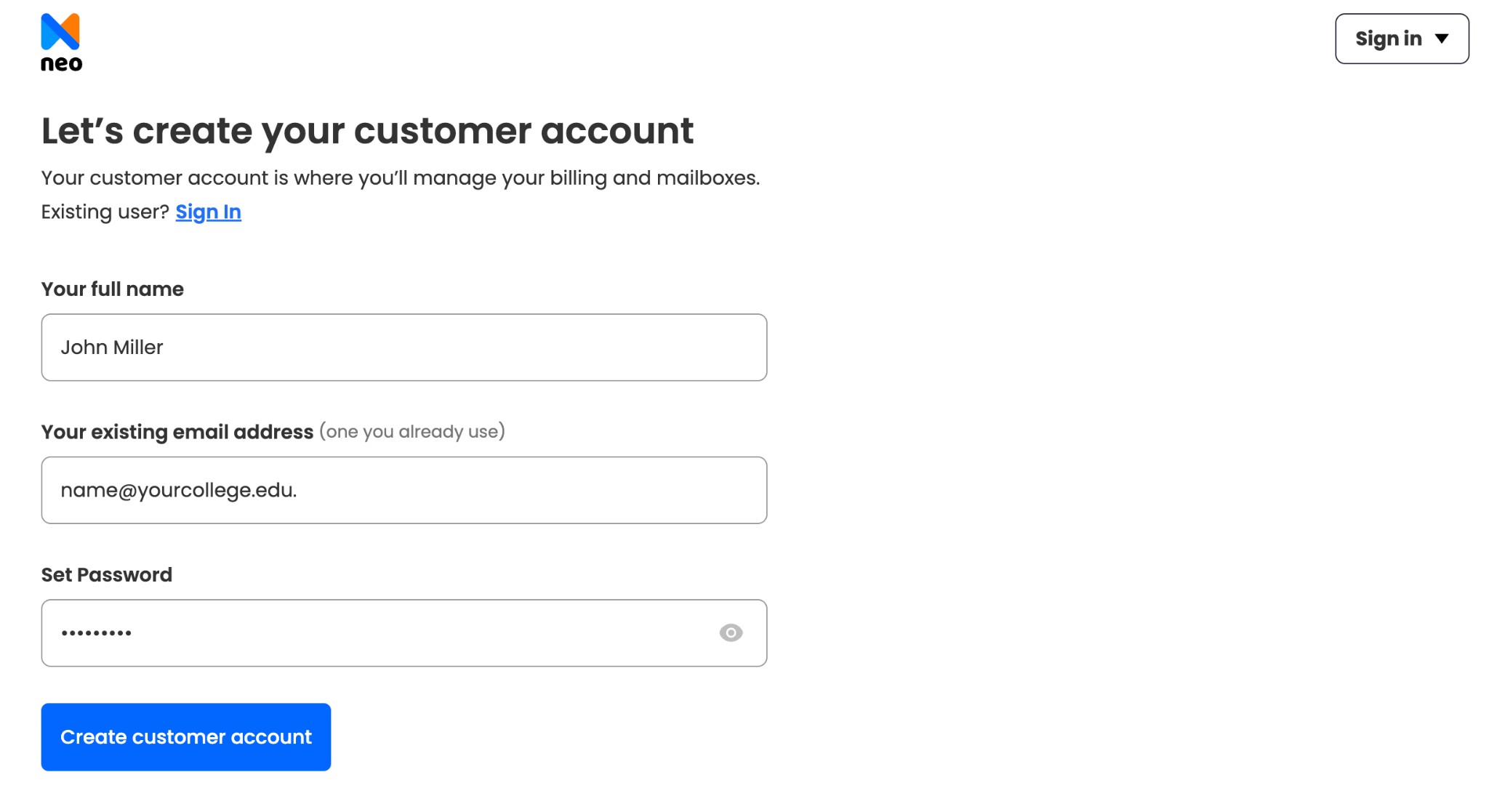
1. Sign up for Neo Mail: Create an account on the Neo Mail website with your name and a current email address.
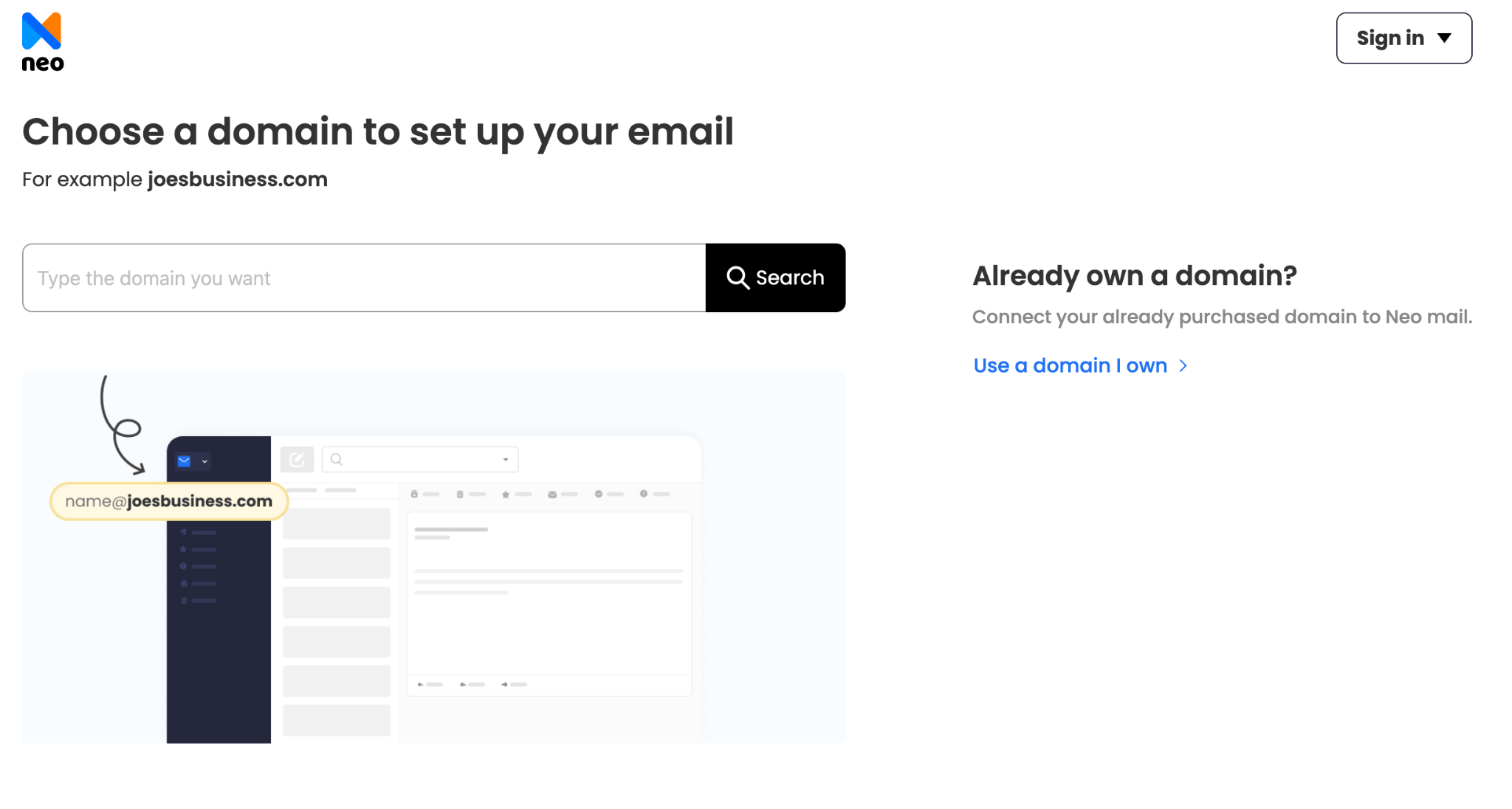
2. Connect your school's .edu domain: Choose the option to use a domain you already own. Your IT team then adds the DNS records Neo Mail provides, such as MX records, the settings that tell the internet where to deliver your email.
3. Create the main mailbox: Set up a primary address, for example - admissions@yourcollege.edu or info@yourcollege.edu.
4. Add more mailboxes: Create addresses for departments or staff, such as registrar@yourcollege.edu, library@yourcollege.edu or finance@yourcollege.edu.
5. Choose a plan and complete payment: Pick the plan with the storage and features you need, then pay to activate your mailboxes.
Before you start, check that your school's IT policy allows email to run outside its main system.
What If Your Student Email Doesn't End in .edu?
Your address still counts as a real student email, even without .edu. K-12 schools, homeschool programs and schools outside the US can't register .edu names. Their students get addresses like name@school.ac.uk, name@uni.edu.au or name@school.onmicrosoft.com instead.
The difference between an edu email and a student email is the domain ending, not your status. A .edu email is a student email from a US college. A student email is any school-issued address. Homeschool students usually can't get a .edu address unless they take a class at a US college.
Students with non-.edu addresses can still claim many offers. GitHub, for example, accepts a dated student ID, a transcript or an enrollment letter instead of a school email. (Source: GitHub Docs)
Once you have a student email, the next question is what it actually gets you.
What Can a Free Student Email Get You?
A free student email gets you free software and discounted subscriptions. The most common are Microsoft's web apps, music streaming and shopping memberships. Each brand sets its own rules, so the same address can pass one check and fail another.
Neo Mail's research team verified these offers in September 2026, on each provider's official website.
Sources: Microsoft Education · Spotify Premium Student · Amazon Prime Student · GitHub Education
Spotify and GitHub check more than your school email, which explains why a .edu address alone is often not enough.
Why Isn't a .edu Address Enough for Most Student Discounts?
A .edu address isn't enough for most student discounts because brands check your current enrollment, not just your email domain. Services like SheerID, UNiDAYS and ID.me confirm your status with your school's records. If the records don't match, the discount is denied.
Many colleges now let graduates keep their email, so a .edu address no longer proves someone is a student. Brands moved to enrollment checks to close that gap. One user in Reddit's r/UnethicalLifeProTips put it plainly: student deals want "a student ID or even… 3rd party verification."
Enrollment checks also repeat. Spotify, for example, asks students to verify again every year. A class you took once won't keep a discount running after that class ends.
If the automatic check fails, you can usually upload a document instead. Most services accept one of these four:
- Student ID: A card that shows the current term or date.
- Enrollment letter: An official letter from the registrar.
- Transcript or class schedule: A current record with your name and school.
- Tuition receipt: A recent bill or payment record from the school.
These checks are the reason shortcuts like edu email generators and bought accounts keep failing.
Are Free .edu Email Generators and Bought Accounts Legit?
No. Free .edu email generators, bought accounts and temporary .edu inboxes aren't legitimate. The school never issued them to you. They get shut down, they fail enrollment checks, and using them likely breaks both the school's rules and the discount's terms.
Buyers report the same outcome. One buyer wrote that a purchased account "stopped working immediately." Generator sites that promise "instant .edu" or "100% free" access have no way to issue a real school account.
A shut-down account also takes your linked accounts with it. Any service you signed up for with that address sends its password reset emails there. Once the address stops working, you can't reset those passwords.
Even a real address has a limited life, which raises the question of whether you keep your edu email after graduation.
Do You Keep Your .edu Email After Graduation?
Only some schools let graduates keep their .edu email. Some colleges give alumni a permanent address or forwarding. Others delete student accounts within weeks. Check your school's IT or alumni office for its exact policy before your last term ends.
Some schools move fast. In Reddit's r/CapellaUniversity, a student reported email deactivation "30 days after graduation" to save costs. When a school deletes a mailbox, new mail to that address bounces back to the sender, and the sender may never learn your new address.
The bigger problem is linked accounts. Password reset emails go to your old address, so you can't recover an account tied to it. Students describe losing GitHub and gaming accounts this way after their school email closed.
Alumni addresses are not a safe fix either. A school that offers alumni email today can change its policy later. Brands also treat alumni addresses as non-student, so they don't restore your discounts.
The fix is simple, but you need to do it before your school email expires.
What Should You Do Before Your School Email Expires?
Before your school email expires, move everything that depends on it to a permanent address. Start at least a month before graduation, because some schools close accounts soon after your last term. Work through this five-step checklist:
- Set up auto-forwarding: Send all new mail to your personal inbox.
- Change the login email on linked accounts: Update GitHub, cloud storage, games and subscriptions.
- Export files and contacts: Download anything stored in your school's Google Drive or OneDrive.
- Save alumni instructions: Note how to request an alumni address, if your school offers one.
- Tell your contacts: Share your new address with professors, employers and clients.
Forwarding is a good first move, but it only buys time. It stops the day the school closes the account.
For graduates starting freelance or business work, a business email on your own domain is a permanent address. Neo Mail is popular with freelancers, creators, consultants and online stores. Every Neo Mail plan includes a free domain if you don't have one.
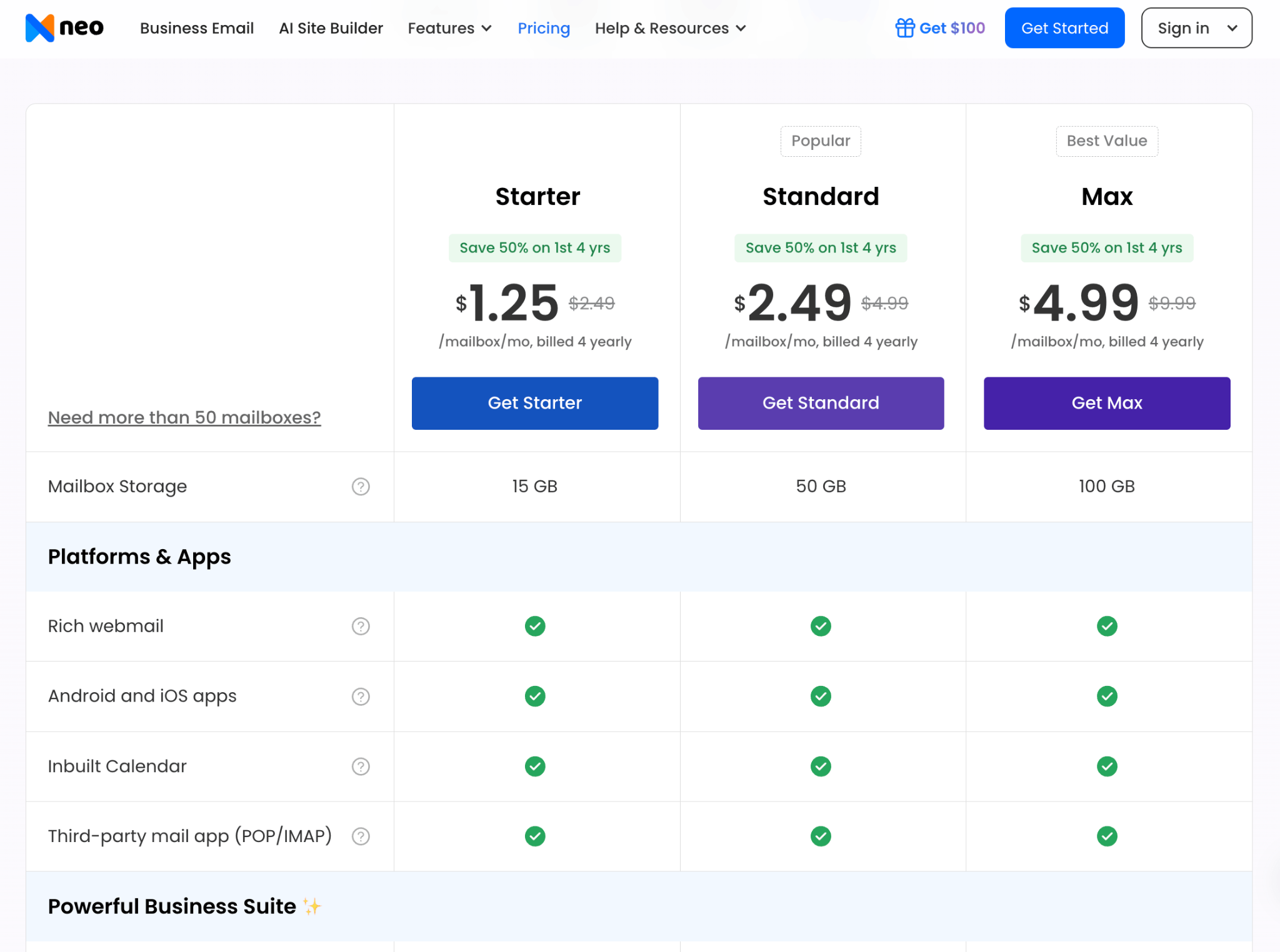
Neo Mail plans start at $1.25 per mailbox per month on the 4-yearly plan. The Starter plan caps sending at 500 emails per day, and sending from an alias needs a higher plan. About 1 in 3 reviewers single out its ease of use. (Source: G2) You can try Neo Mail free for 15 days. For other options, see our guide to making your own custom email.
FAQs
Is It Easy to Get a .edu Domain?
No. A .edu domain is limited to US postsecondary schools with institutional accreditation. Individuals, businesses, K-12 schools and foreign schools can't register one. The same rule means you can't buy a .edu website for yourself or your business.
How Long After Enrolling Do You Get a .edu Email?
Most colleges send your .edu email login after they process your enrollment, often before classes start. The timing varies by school and term. Check your college's admissions or IT help page, which usually explains when accounts are created and how to activate yours.
How Can I Get a Temporary Student Email?
You can't get a legitimate temporary student email. Short-term access comes only from a real short course, and it ends when your enrollment does. Temporary .edu inboxes online aren't school-issued, so they fail enrollment checks and can lock you out of linked accounts.
Can I Get a .edu Email Without Being a Student?
Yes, but only if a college employs you. Faculty and staff get .edu addresses, though those don't qualify for student discounts. Everyone else needs to become a student, and the lowest-cost way is one real class at an accredited community college.
What Email Can I Get for Free?
Anyone can get a free personal email account without being a student. Gmail and Outlook.com both offer free personal inboxes that you create in a few minutes. Our guide to creating a free email address compares the free options and walks through the setup.
Get Business Email
No domain name required
Create .Edu Email
Get yourname@yourdomian.edu ID
